Tag: c#
LOGO SAYISAL ZAMAN İŞLEMLERİ
C# Fonksiyonu
        private string LogoTimetoSystemTime(double GELENDEGER)
        {
            string RESULT = "";
            int HOUR = 0;
            if (GELENDEGER > 0)
            {
                HOUR = Convert.ToInt32(Math.Round(GELENDEGER / 16777216, 2));
            }
            int MINUTE = 0;
            if (GELENDEGER > 0)
            {
                MINUTE = Convert.ToInt32(Math.Round((GELENDEGER - HOUR * 16777216) / 65536, 2));
            }
            int SECOND = 0;
            if (GELENDEGER > 0)
            {
                SECOND = Convert.ToInt32(Math.Round((GELENDEGER - HOUR * 16777216 - MINUTE * 65536) / 256, 2));
            }
            RESULT = HOUR.ToString() + ":" + (MINUTE.ToString().Length == 0 ? 0 + MINUTE.ToString() : MINUTE.ToString()) + ":" + (SECOND.ToString().Length == 0 ? 0 + SECOND.ToString() : SECOND.ToString());
            return RESULT;
        }
Sql Fonksiyonu
create FUNCTION [dbo].[fn_LogoTimetoSystemTime] (@GELENDEGER INT)
RETURNS VARCHAR(8)
AS
BEGIN
DECLARE @SAAT VARCHAR(2), @DAKIKA VARCHAR(2), @SANIYE VARCHAR(2), @SONUC VARCHAR(8)

SELECT
@SAAT=RTRIM(CONVERT(char(20), ROUND(@GELENDEGER / 16777216, 2))),
@DAKIKA=RTRIM(CONVERT(char(20), ROUND((@GELENDEGER - ROUND(@GELENDEGER / 16777216, 2) * 16777216)/ 65536, 2))),
@SANIYE=RTRIM(CONVERT(char(20), ROUND((@GELENDEGER - ROUND(@GELENDEGER / 16777216, 2) * 16777216 - ROUND((@GELENDEGER - ROUND(@GELENDEGER / 16777216, 2) * 16777216) / 65536, 2) * 65536) / 256, 2)))

SET @SAAT=CASE WHEN LEN(@SAAT)=1 THEN '0'+@SAAT ELSE @SAAT END
SET @DAKIKA=CASE WHEN LEN(@DAKIKA)=1 THEN '0'+@DAKIKA ELSE @DAKIKA END
SET @SANIYE=CASE WHEN LEN(@SANIYE)=1 THEN '0'+@SANIYE ELSE @SANIYE END


SET @SONUC= @SAAT + ':' +@DAKIKA + ':' + @SANIYE

RETURN @SONUC
END
CREATE FUNCTION [dbo].[LG_TIMETOINT](@HH INT,@MM INT,@SS INT)
RETURNS INT
AS
BEGIN
DECLARE @TIME    INT
SELECT @TIME   = (@HH*65536*256+@MM*65536+@SS*256)
RETURN(@TIME)
END
GO

CREATE FUNCTION [dbo].[LG_INTTOTIME](@TIME INT)
RETURNS VARCHAR(8)
AS
BEGIN
DECLARE @HH INT
DECLARE @MM INT
DECLARE @SS INT
SELECT @HH = @TIME/65536/256
SELECT @MM = (@TIME/65536) - (@HH*256)
SELECT @SS = (@TIME/256) - (@HH*65536) - (@MM*256)
RETURN (RIGHT('0'+CAST(@HH AS VARCHAR(2)),2)+':'+RIGHT('0'+CAST(@MM AS VARCHAR(2)),2)+':'+RIGHT('0'+CAST(@SS AS VARCHAR(2)),2))
END
GO

CREATE FUNCTION [dbo].[LG_ADDTIME](@TIME INT,@ADD INT)
RETURNS INT
AS
BEGIN
DECLARE @HH INT
DECLARE @MM INT
DECLARE @SS INT
SELECT @HH = @TIME/65536/256
SELECT @MM = (@TIME/65536) - (@HH*256)
SELECT @SS = (@TIME/256) - (@HH*65536) - (@MM*256)
SELECT @SS = @SS + @ADD
IF @SS > 59
BEGIN
SELECT @MM = @MM + 1
SELECT @SS = @SS - 60
END
IF @MM > 59
BEGIN
SELECT @HH = @HH + 1
SELECT @MM = @MM - 60
END
RETURN (@HH*65536*256+@MM*65536+@SS*256)
END
GO
CREATE FUNCTION [dbo].[fn_LogoDatetoSystemDate] (@DEGER INT)
RETURNS datetime
AS
BEGIN

DECLARE @GUN VARCHAR(2), @AY VARCHAR(2), @YIL VARCHAR(4)
DECLARE @SONUC datetime


SELECT
	@GUN=CAST((CONVERT(INT,CONVERT(BINARY,@DEGER,2),0)-(CONVERT(INT,CONVERT(BINARY,@DEGER,2),0)/256*256)) AS VARCHAR(3))
SELECT
	@AY=CAST(((CONVERT(INT,CONVERT(BINARY,@DEGER,2),0)-(65536*(CONVERT(INT,CONVERT(BINARY,@DEGER,2),0)/65536)))-(CONVERT(INT,CONVERT(BINARY,@DEGER,2),0)-(CONVERT(INT,CONVERT(BINARY,@DEGER,2),0)/256*256)))/256 AS VARCHAR(3))
SELECT
	@YIL=CAST((CONVERT(INT,CONVERT(BINARY,@DEGER,2),0)/65536) AS VARCHAR(6))

	SET @GUN=CASE WHEN LEN(@GUN)<2 THEN '0'+@GUN ELSE @GUN END
	SET @AY=CASE WHEN LEN(@AY)<2 THEN '0'+@AY ELSE @AY END


SONUC:
	IF @DEGER<>0
	BEGIN
		SET @SONUC=CONVERT(DATETIME, @YIL + '-' + @AY + '-' +  @GUN + ' 00:00:00', 102)
	END
	IF @DEGER=0
		SET @SONUC= NULL


RETURN @SONUC
END
GO
CREATE FUNCTION [dbo].[fn_SystemDateToLogoDate] (@date DATETIME)
RETURNS INT
AS
BEGIN

DECLARE @GUN INT, @AY INT, @YIL INT
DECLARE @SONUC INT

SET @YIL = YEAR(@date)
SET @AY = MONTH(@date)
SET @GUN = DAY(@date)

SET @SONUC = (@YIL * 65536) + (@AY * 256) + @GUN

IF @SONUC = 0
    SET @SONUC = NULL

RETURN @SONUC
END
GO
C# Devexpress xaf snippets

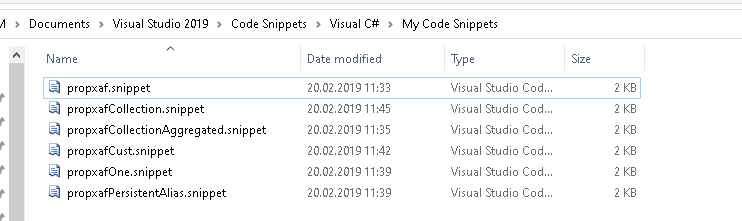
<?xml version="1.0" encoding="utf-8" ?>
<CodeSnippets  xmlns="http://schemas.microsoft.com/VisualStudio/2005/CodeSnippet">
  <CodeSnippet Format="1.0.0">
    <Header>
      <Title>propxaf</Title>
      <Shortcut>propxaf</Shortcut>
      <Description>Insert a property in XPO</Description>
      <Author>Llamachant Technology Ltd.</Author>
      <SnippetTypes>
        <SnippetType>Expansion</SnippetType>
      </SnippetTypes>
    </Header>
    <Snippet>
      <Declarations>
        <Literal>
          <ID>type</ID>
          <ToolTip>Property type</ToolTip>
          <Default>string</Default>
        </Literal>
        <Literal>
          <ID>property</ID>
          <ToolTip>Property name</ToolTip>
          <Default>Name</Default>
        </Literal>
      </Declarations>
      <Code Language="csharp">
        <![CDATA[
		private $type$ _$property$;
        public $type$ $property$
        {
          get { return _$property$;}
          set { SetPropertyValue<$type$>(nameof($property$), ref _$property$, value); }
        }

			$end$]]>
      </Code>
    </Snippet>
  </CodeSnippet>
</CodeSnippets>
propxafCollection.snippet:
<?xml version="1.0" encoding="utf-8" ?>
<CodeSnippets  xmlns="http://schemas.microsoft.com/VisualStudio/2005/CodeSnippet">
  <CodeSnippet Format="1.0.0">
    <Header>
      <Title>propxafCollection</Title>
      <Shortcut>propxafCollection</Shortcut>
      <Description>Insert a collection in XPO</Description>
      <Author>Llamachant Technology Ltd.</Author>
      <SnippetTypes>
        <SnippetType>Expansion</SnippetType>
      </SnippetTypes>
    </Header>
    <Snippet>
      <Declarations>
        <Literal>
          <ID>type</ID>
          <ToolTip>Remote Property type</ToolTip>
          <Default>DomainObject</Default>
        </Literal>
        <Literal>
          <ID>property</ID>
          <ToolTip>Collection Property name</ToolTip>
          <Default>MyProperty</Default>
        </Literal>
      </Declarations>
      <Code Language="csharp">
        <![CDATA[
        [Association]
        public XPCollection<$type$> $property$ {
          get { return GetCollection<$type$>(nameof($property$)); }
        }
			$end$]]>
      </Code>
    </Snippet>
  </CodeSnippet>
</CodeSnippets>
propxafCollectionAggregated.snippet
<?xml version="1.0" encoding="utf-8" ?>
<CodeSnippets  xmlns="http://schemas.microsoft.com/VisualStudio/2005/CodeSnippet">
  <CodeSnippet Format="1.0.0">
    <Header>
      <Title>propxafCollectionAggregated</Title>
      <Shortcut>propxafCollectionAggregated</Shortcut>
      <Description>Insert an aggregated collection (No link/unlink) in XPO</Description>
      <Author>Llamachant Technology Ltd.</Author>
      <SnippetTypes>
        <SnippetType>Expansion</SnippetType>
      </SnippetTypes>
    </Header>
    <Snippet>
      <Declarations>
        <Literal>
          <ID>type</ID>
          <ToolTip>Remote Property Type</ToolTip>
          <Default>DomainObject</Default>
        </Literal>
        <Literal>
          <ID>property</ID>
          <ToolTip>Collection Property Name</ToolTip>
          <Default>CollectionName</Default>
        </Literal>
      </Declarations>
      <Code Language="csharp">
        <![CDATA[
        [DevExpress.Xpo.Aggregated, Association]
        public XPCollection<$type$> $property$ {
          get { return GetCollection<$type$>(nameof($property$)); }
        }
			$end$]]>
      </Code>
    </Snippet>
  </CodeSnippet>
</CodeSnippets>
propxafCust.snippet
<?xml version="1.0" encoding="utf-8" ?>
<CodeSnippets  xmlns="http://schemas.microsoft.com/VisualStudio/2005/CodeSnippet">
  <CodeSnippet Format="1.0.0">
    <Header>
      <Title>propxafCust</Title>
      <Shortcut>propxafCust</Shortcut>
      <Description>Insert a custom object with default Name property</Description>
      <Author>Llamachant Technology Ltd.</Author>
      <SnippetTypes>
        <SnippetType>Expansion</SnippetType>
      </SnippetTypes>
    </Header>
    <Snippet>
      <Declarations>
        <Literal>
          <ID>class</ID>
          <ToolTip>Class Name</ToolTip>
          <Default>CustomObject</Default>
        </Literal>
		<Literal>
		  <ID>classtype</ID>
		  <ToolTip>XPO Base Object Type (BaseObject, XPCustomObject, XPLiteObject, etc.)</ToolTip>
		  <Default>BaseObject</Default>
		</Literal>
      </Declarations>
      <Code Language="csharp">
        <![CDATA[
		[DefaultProperty("Name")]
		public class $class$ : $classtype$
		{
			public $class$(Session session) : base(session) { }
			private string _Name;
			public string Name
			{
				get { return _Name; }
				set { SetPropertyValue<string>("Name", ref _Name, value); }
			}
		}

			$end$]]>
      </Code>
    </Snippet>
  </CodeSnippet>
</CodeSnippets>
propxafOne.snippet
<?xml version="1.0" encoding="utf-8" ?>
<CodeSnippets  xmlns="http://schemas.microsoft.com/VisualStudio/2005/CodeSnippet">
  <CodeSnippet Format="1.0.0">
    <Header>
      <Title>propxafOne</Title>
      <Shortcut>propxafOne</Shortcut>
      <Description>Insert a property with a One to Many relationship in XPO</Description>
      <Author>Llamachant Technology Ltd.</Author>
      <SnippetTypes>
        <SnippetType>Expansion</SnippetType>
      </SnippetTypes>
    </Header>
    <Snippet>
      <Declarations>
        <Literal>
          <ID>type</ID>
          <ToolTip>Property Type</ToolTip>
          <Default>DomainObject</Default>
        </Literal>
        <Literal>
          <ID>property</ID>
          <ToolTip>Property Name</ToolTip>
          <Default>MyProperty</Default>
        </Literal>
      </Declarations>
      <Code Language="csharp">
	   <![CDATA[
		private $type$ _$property$;
		[Association]
        public $type$ $property$
        {
          get { return _$property$;}
          set { SetPropertyValue<$type$>(nameof($property$), ref _$property$, value); }
        }

			$end$]]>
      </Code>
    </Snippet>
  </CodeSnippet>
</CodeSnippets>
propxafPersistentAlias.snippet
<?xml version="1.0" encoding="utf-8" ?>
<CodeSnippets  xmlns="http://schemas.microsoft.com/VisualStudio/2005/CodeSnippet">
  <CodeSnippet Format="1.0.0">
    <Header>
      <Title>propxafPersistentAlias</Title>
      <Shortcut>propxafPersistentAlias</Shortcut>
      <Description>Insert a persistent alias property in XPO</Description>
      <Author>Llamachant Technology Ltd.</Author>
      <SnippetTypes>
        <SnippetType>Expansion</SnippetType>
      </SnippetTypes>
    </Header>
    <Snippet>
      <Declarations>
	<Literal>
          <ID>expression</ID>
          <ToolTip>Alias Expression</ToolTip>
          <Default></Default>
        </Literal>
        <Literal>
          <ID>type</ID>
          <ToolTip>Property Type</ToolTip>
          <Default>string</Default>
        </Literal>
        <Literal>
          <ID>property</ID>
          <ToolTip>Property Name</ToolTip>
          <Default>Name</Default>
        </Literal>
		<Literal>
          <ID>converttype</ID>
          <ToolTip>Convert to Type</ToolTip>
          <Default>Int32</Default>
        </Literal>
      </Declarations>
      <Code Language="csharp">
        <![CDATA[
	[PersistentAlias("$expression$")]
        public $type$ $property$
        {
          get { return Convert.To$converttype$(EvaluateAlias(nameof($property$))); }
        }
			$end$]]>
      </Code>
    </Snippet>
  </CodeSnippet>
</CodeSnippets>
YEDEK KOPYALAMA
Talep: Logo – Sql Data’nın yedeklediği klasordeki isteğe bağlı en güncel yedeği (en güncel 1 dosyayı ) networkde sürücüye atanmış başka bir yere kopyala. (Not:Aynı dosya orada var ise kopyalamasın).
Yapı: Exeye parametre gönderilince kopyalama işlemini yapıp exeyi kapatacak. öncesinde source folder(kaynak klasör) ve destination folder(hedef klasör) belirlemek için exe direk çalıştırılır. Son olarak windows task schedulera(windows görev yöneticisi) ekleme yaparak exeye parametreli gönderimle istenilen zamanda çalışması için ayarlar yapılır.
Ayar Ekranı(indir -113kb ) :

SQL SERVER COLUMNLARI DATATABLEA DİNAMİK OLARAK AKTARMA
        public static DataTable getReadingTableFromSchema()
        {
            string TARIH = DateTime.Now.Month.ToString() + "-" + DateTime.Now.Day.ToString() + "-" + DateTime.Now.Year.ToString();
            using (SqlConnection conn = new SqlConnection(CS))
            {
                string sql = string.Format("EXEC[LG_118_ONAY] '','{0}'",  TARIH);
                conn.Open();
                SqlCommand cmd = new SqlCommand(sql, conn);
                DbDataAdapter da = new SqlDataAdapter(cmd);
                DataTable dtbl = new DataTable();
                da.FillSchema(dtbl, SchemaType.Source);
                return dtbl;
            }
        }

        private void INITIALIZEGV()
        {
            DataTable DTNEW = getReadingTableFromSchema();
            DataTable DT = _M.SELECT_LISTE();
            string TARIH = DateTime.Now.Month.ToString() + "-" + DateTime.Now.Day.ToString() + "-" + DateTime.Now.Year.ToString();

            foreach (DataRow item in DT.Rows)
            {
                string STUDENTCODE = item[0].ToString();
                DataRow s = _M.SELECT_ONAY(CODE, TARIH).Rows[0];
                DTNEW.ImportRow(s);
            }

            gc_CONTROL1.DataSource = DTNEW;
        }
C# DEVEXPRESS XTRAINPUTBOX
BAZEN FORM YARATMADAN BURDAN DEĞER ALINABİLİR

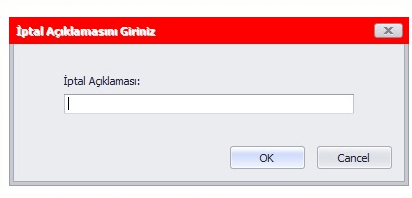

            string reason = XtraInputBox.Show("Açıklama", "İptal Açıklamasını Giriniz", "");

            if (string.IsNullOrEmpty(reason) || string.IsNullOrWhiteSpace(reason) || reason == "")
            {
                MessageBox.Show("İptal İşleminde Açıklama Girmek Zorunludur.", "", MessageBoxButtons.OK, MessageBoxIcon.Error);
                return;
            }
//handle cancel
   private void PrintBarcodeDirectClick(object sender, EventArgs e)
        {
            XtraInputBoxArgs xtraInputBoxArgs = new XtraInputBoxArgs();
            xtraInputBoxArgs.Caption = "Miktar";
            xtraInputBoxArgs.Prompt = "Yazılacak Miktar Giriniz";
            xtraInputBoxArgs.DefaultButtonIndex = 0;
            xtraInputBoxArgs.Showing += XtraInputBoxArgs_Showing;
            xtraInputBoxArgs.DefaultResponse = "1";

            SpinEdit editor = new SpinEdit();
            editor.Properties.IsFloatValue = false;
            editor.Properties.Mask.EditMask = "N00";
            editor.Properties.Mask.MaskType = DevExpress.XtraEditors.Mask.MaskType.Numeric;
            editor.Properties.Mask.UseMaskAsDisplayFormat = true;
            xtraInputBoxArgs.Editor = editor;

            var qty = XtraInputBox.Show(xtraInputBoxArgs);
            var result = qty?.ToString();
            MessageBox.Show(result);


        }

        private void XtraInputBoxArgs_Showing(object sender, XtraMessageShowingArgs e)
        {
            e.Form.Text = "Miktar";
        }
C# PROGRAM.CS CULTUREINFO
using System;
using System.Collections.Generic;
using System.Linq;
using System.Threading;
using System.Threading.Tasks;
using System.Windows.Forms;

namespace XXXDAS {
    static class Program {
        /// <summary>
        /// The main entry point for the application.
        /// </summary>
        [STAThread]
        static void Main() {
            Thread.CurrentThread.CurrentCulture = new System.Globalization.CultureInfo("tr-TR");
            Thread.CurrentThread.CurrentUICulture = new System.Globalization.CultureInfo("tr-TR");
            DevExpress.UserSkins.BonusSkins.Register();

            DevExpress.LookAndFeel.UserLookAndFeel.Default.SetSkinStyle("McSkin");

            Application.EnableVisualStyles();

            Application.SetCompatibleTextRenderingDefault(false);

            Application.Run(new Login());
        }
    }
}
DEVEXPRESS GRID LOAD SAVE FROM REGISTRY VERSION
   string version = "";
        public FRM_MALZEME_FIYATLARI() {
            InitializeComponent();
            version = "v" + Assembly.GetEntryAssembly().GetName().Version;
  DX.DXGRID_LOADLAYOUTFROM_REGISTIRY(GRC_MALZEMEFIYATLARI, GetType().Namespace, "SATISFIYATI_OTOMASYONU_SERVICE__FRM_MALZEMELER_FIYATLARI" + version);
  DX.DXGRID_SAVELAYOUTTO_REGISTIRY(GRC_MALZEMEFIYATLARI, GetType().Namespace, "SATISFIYATI_OTOMASYONU_SERVICE__FRM_MALZEMELER_FIYATLARI" + version);
        }
C# BELİRLENEN ZAMANDA PROCCESS KILL İŞLEMİ
private void LOBJECTSKILLER() {
    try {
        TimeSpan ts1 = TimeSpan.Parse("05:00:00");
        TimeSpan ts2 = TimeSpan.Parse("06:00:00");
        if (DateTime.Now.TimeOfDay >= ts1 && DateTime.Now.TimeOfDay <= ts2) {
            foreach (Process p in Process.GetProcessesByName("LOBJECTS")) {
                p.Kill();
            }
        }


    } catch (Exception EX) {

        DLL.GLOBAL.LOGYAZ("LOBJECTSKILLER:", EX);
    }
}
MS SQL TO C# CLASS
declare @TableName sysname = 'CFGUSERSLIST'
declare @result varchar(max) = 'public class ' + @TableName + '
{'

select @result = @result + '
    public ' + ColumnType + ' ' + ColumnName + ' { get; set; }
'
from
(
    select
        replace(col.name, ' ', '_') ColumnName,
        column_id,
        case typ.name
            when 'bigint' then 'long'
            when 'binary' then 'byte[]'
            when 'bit' then 'bool'
            when 'char' then 'string'
            when 'date' then 'DateTime'
            when 'datetime' then 'DateTime'
            when 'datetime2' then 'DateTime'
            when 'datetimeoffset' then 'DateTimeOffset'
            when 'decimal' then 'decimal'
            when 'float' then 'float'
            when 'image' then 'byte[]'
            when 'int' then 'int'
            when 'money' then 'decimal'
            when 'nchar' then 'char'
            when 'ntext' then 'string'
            when 'numeric' then 'decimal'
            when 'nvarchar' then 'string'
            when 'real' then 'double'
            when 'smalldatetime' then 'DateTime'
            when 'smallint' then 'short'
            when 'smallmoney' then 'decimal'
            when 'text' then 'string'
            when 'time' then 'TimeSpan'
            when 'timestamp' then 'DateTime'
            when 'tinyint' then 'byte'
            when 'uniqueidentifier' then 'Guid'
            when 'varbinary' then 'byte[]'
            when 'varchar' then 'string'
            else 'UNKNOWN_' + typ.name
        end +
        CASE
            WHEN col.is_nullable=1 AND
                 typ.name NOT IN (
                     'binary', 'varbinary', 'image',
                     'text', 'ntext',
                     'varchar', 'nvarchar', 'char', 'nchar')
            THEN '?'
            ELSE '' END AS [ColumnType]
    from sys.columns col
        join sys.types typ on
            col.system_type_id = typ.system_type_id AND col.user_type_id = typ.user_type_id
    where object_id = object_id(@TableName)
) t
order by column_id

set @result = @result  + '
}'

print @result

 Blog of Sem