   private void gridView1_PopupMenuShowing(object sender, DevExpress.XtraGrid.Views.Grid.PopupMenuShowingEventArgs e)
        {
                if (e.MenuType == GridMenuType.Column)
                {
                    GridViewColumnMenu menu = e.Menu as GridViewColumnMenu;
                    if (menu.Column != null)
                    {
                        var myMenu = new DXMenuCheckItem("Sola - Kolon Sabitle/Geri Al", menu.Column.Fixed == FixedStyle.Left, default, new EventHandler(FreezeUnfreezeColumnLeft_Click));
                        myMenu.Image = global::MYAPP.Properties.Resources.Left;        //LEFT ARROW ICON FOR myMenu.Image = Left.png

                        myMenu.BeginGroup = true;
                        myMenu.Enabled = true;
                        myMenu.Tag = menu.Column;
                        e.Menu.Items.Add(myMenu);

                        var myMenu2 = new DXMenuCheckItem("Sağa - Kolon Sabitle/Geri Al", menu.Column.Fixed == FixedStyle.Right, default, new EventHandler(FreezeUnfreezeColumnRight_Click));
                        myMenu2.Image = global::MYAPP.Properties.Resources.Right; //RIGHT ARROW ICON FOR myMenu2.Image = Right.png
                        myMenu2.BeginGroup = false;
                        myMenu2.Enabled = true;
                        myMenu2.Tag = menu.Column;
                        e.Menu.Items.Add(myMenu2);
                    }
                }
	}

        private void FreezeUnfreezeColumnLeft_Click(object sender, EventArgs e)
        {
            DXMenuCheckItem item = sender as DXMenuCheckItem;
            GridColumn info = (GridColumn)item.Tag;
            if (info is null)
                return;
            if (info.Fixed == FixedStyle.Left)
            {
                info.Fixed = FixedStyle.None;
            }
            else
            {
                info.Fixed = FixedStyle.Left;
            }

        }

    private void FreezeUnfreezeColumnRight_Click(object sender, EventArgs e)
        {
            DXMenuCheckItem item = sender as DXMenuCheckItem;
            GridColumn info = (GridColumn)item.Tag;
            if (info is null)
                return;
            if (info.Fixed == FixedStyle.Right)
            {
                info.Fixed = FixedStyle.None;
            }
            else
            {
                info.Fixed = FixedStyle.Right;
            }
        }
Category: visual studio
Dosya/Klasör sağ tık Vs Code ile aç
aşağıdaki içeriği xxx.reg isminde bir dosya yaratıp içine at kaydet ve çalıştır.
Windows Registry Editor Version 5.00
; Open files
[HKEY_CLASSES_ROOT*\shell\Open with VS Code]
@=”Edit with VS Code”
“Icon”=”C:\Program Files\Microsoft VS Code\Code.exe,0”
[HKEY_CLASSES_ROOT*\shell\Open with VS Code\command]
@=”\”C:\Program Files\Microsoft VS Code\Code.exe\” \”%1\””
; This will make it appear when you right click ON a folder
; The “Icon” line can be removed if you don’t want the icon to appear
[HKEY_CLASSES_ROOT\Directory\shell\vscode]
@=”Open Folder as VS Code Project”
“Icon”=”\”C:\Program Files\Microsoft VS Code\Code.exe\”,0″
[HKEY_CLASSES_ROOT\Directory\shell\vscode\command]
@=”\”C:\Program Files\Microsoft VS Code\Code.exe\” \”%1\””
; This will make it appear when you right click INSIDE a folder
; The “Icon” line can be removed if you don’t want the icon to appear
[HKEY_CLASSES_ROOT\Directory\Background\shell\vscode]
@=”Open Folder as VS Code Project”
“Icon”=”\”C:\Program Files\Microsoft VS Code\Code.exe\”,0″
[HKEY_CLASSES_ROOT\Directory\Background\shell\vscode\command]
@=”\”C:\Program Files\Microsoft VS Code\Code.exe\” \”%V\””
C# Devexpress Xaf Notları
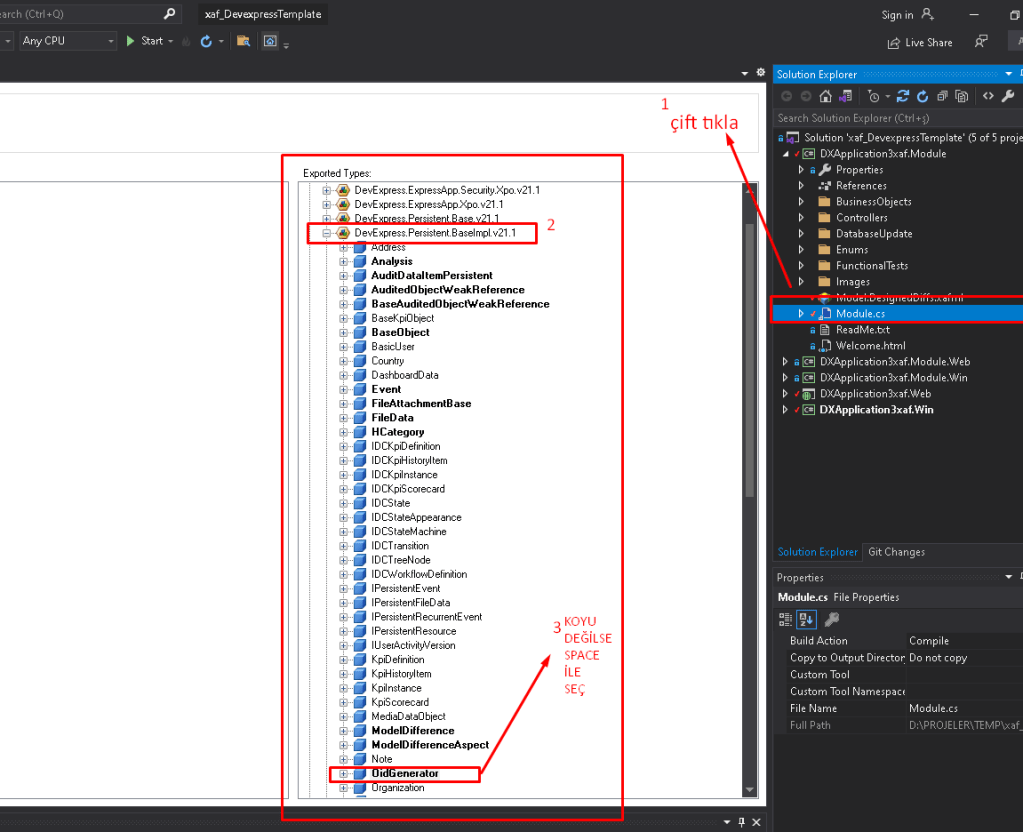
Eğer BusinnesObjects Class XPObject üzerinden inherit oluyorsa (varsayılan BaseObject) Detail viewde oid alanı gelmekte. Bunu gizlemek için Module\Module.cs eklenmeli;
typesInfo.FindTypeInfo(typeof(XPObject)).KeyMember.AddAttribute(new BrowsableAttribute(false));

OnSaving()de otomatik kod ataması için DistributedIdGeneratorHelper.Generate kullanımı;

C# Devexpress xaf snippets

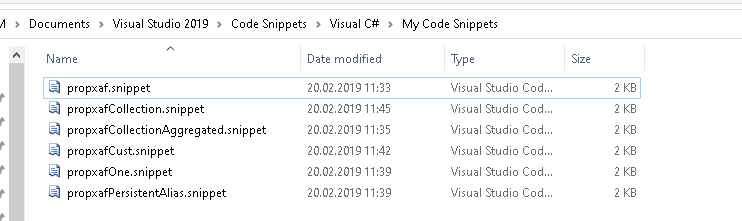
<?xml version="1.0" encoding="utf-8" ?>
<CodeSnippets  xmlns="http://schemas.microsoft.com/VisualStudio/2005/CodeSnippet">
  <CodeSnippet Format="1.0.0">
    <Header>
      <Title>propxaf</Title>
      <Shortcut>propxaf</Shortcut>
      <Description>Insert a property in XPO</Description>
      <Author>Llamachant Technology Ltd.</Author>
      <SnippetTypes>
        <SnippetType>Expansion</SnippetType>
      </SnippetTypes>
    </Header>
    <Snippet>
      <Declarations>
        <Literal>
          <ID>type</ID>
          <ToolTip>Property type</ToolTip>
          <Default>string</Default>
        </Literal>
        <Literal>
          <ID>property</ID>
          <ToolTip>Property name</ToolTip>
          <Default>Name</Default>
        </Literal>
      </Declarations>
      <Code Language="csharp">
        <![CDATA[
		private $type$ _$property$;
        public $type$ $property$
        {
          get { return _$property$;}
          set { SetPropertyValue<$type$>(nameof($property$), ref _$property$, value); }
        }

			$end$]]>
      </Code>
    </Snippet>
  </CodeSnippet>
</CodeSnippets>
propxafCollection.snippet:
<?xml version="1.0" encoding="utf-8" ?>
<CodeSnippets  xmlns="http://schemas.microsoft.com/VisualStudio/2005/CodeSnippet">
  <CodeSnippet Format="1.0.0">
    <Header>
      <Title>propxafCollection</Title>
      <Shortcut>propxafCollection</Shortcut>
      <Description>Insert a collection in XPO</Description>
      <Author>Llamachant Technology Ltd.</Author>
      <SnippetTypes>
        <SnippetType>Expansion</SnippetType>
      </SnippetTypes>
    </Header>
    <Snippet>
      <Declarations>
        <Literal>
          <ID>type</ID>
          <ToolTip>Remote Property type</ToolTip>
          <Default>DomainObject</Default>
        </Literal>
        <Literal>
          <ID>property</ID>
          <ToolTip>Collection Property name</ToolTip>
          <Default>MyProperty</Default>
        </Literal>
      </Declarations>
      <Code Language="csharp">
        <![CDATA[
        [Association]
        public XPCollection<$type$> $property$ {
          get { return GetCollection<$type$>(nameof($property$)); }
        }
			$end$]]>
      </Code>
    </Snippet>
  </CodeSnippet>
</CodeSnippets>
propxafCollectionAggregated.snippet
<?xml version="1.0" encoding="utf-8" ?>
<CodeSnippets  xmlns="http://schemas.microsoft.com/VisualStudio/2005/CodeSnippet">
  <CodeSnippet Format="1.0.0">
    <Header>
      <Title>propxafCollectionAggregated</Title>
      <Shortcut>propxafCollectionAggregated</Shortcut>
      <Description>Insert an aggregated collection (No link/unlink) in XPO</Description>
      <Author>Llamachant Technology Ltd.</Author>
      <SnippetTypes>
        <SnippetType>Expansion</SnippetType>
      </SnippetTypes>
    </Header>
    <Snippet>
      <Declarations>
        <Literal>
          <ID>type</ID>
          <ToolTip>Remote Property Type</ToolTip>
          <Default>DomainObject</Default>
        </Literal>
        <Literal>
          <ID>property</ID>
          <ToolTip>Collection Property Name</ToolTip>
          <Default>CollectionName</Default>
        </Literal>
      </Declarations>
      <Code Language="csharp">
        <![CDATA[
        [DevExpress.Xpo.Aggregated, Association]
        public XPCollection<$type$> $property$ {
          get { return GetCollection<$type$>(nameof($property$)); }
        }
			$end$]]>
      </Code>
    </Snippet>
  </CodeSnippet>
</CodeSnippets>
propxafCust.snippet
<?xml version="1.0" encoding="utf-8" ?>
<CodeSnippets  xmlns="http://schemas.microsoft.com/VisualStudio/2005/CodeSnippet">
  <CodeSnippet Format="1.0.0">
    <Header>
      <Title>propxafCust</Title>
      <Shortcut>propxafCust</Shortcut>
      <Description>Insert a custom object with default Name property</Description>
      <Author>Llamachant Technology Ltd.</Author>
      <SnippetTypes>
        <SnippetType>Expansion</SnippetType>
      </SnippetTypes>
    </Header>
    <Snippet>
      <Declarations>
        <Literal>
          <ID>class</ID>
          <ToolTip>Class Name</ToolTip>
          <Default>CustomObject</Default>
        </Literal>
		<Literal>
		  <ID>classtype</ID>
		  <ToolTip>XPO Base Object Type (BaseObject, XPCustomObject, XPLiteObject, etc.)</ToolTip>
		  <Default>BaseObject</Default>
		</Literal>
      </Declarations>
      <Code Language="csharp">
        <![CDATA[
		[DefaultProperty("Name")]
		public class $class$ : $classtype$
		{
			public $class$(Session session) : base(session) { }
			private string _Name;
			public string Name
			{
				get { return _Name; }
				set { SetPropertyValue<string>("Name", ref _Name, value); }
			}
		}

			$end$]]>
      </Code>
    </Snippet>
  </CodeSnippet>
</CodeSnippets>
propxafOne.snippet
<?xml version="1.0" encoding="utf-8" ?>
<CodeSnippets  xmlns="http://schemas.microsoft.com/VisualStudio/2005/CodeSnippet">
  <CodeSnippet Format="1.0.0">
    <Header>
      <Title>propxafOne</Title>
      <Shortcut>propxafOne</Shortcut>
      <Description>Insert a property with a One to Many relationship in XPO</Description>
      <Author>Llamachant Technology Ltd.</Author>
      <SnippetTypes>
        <SnippetType>Expansion</SnippetType>
      </SnippetTypes>
    </Header>
    <Snippet>
      <Declarations>
        <Literal>
          <ID>type</ID>
          <ToolTip>Property Type</ToolTip>
          <Default>DomainObject</Default>
        </Literal>
        <Literal>
          <ID>property</ID>
          <ToolTip>Property Name</ToolTip>
          <Default>MyProperty</Default>
        </Literal>
      </Declarations>
      <Code Language="csharp">
	   <![CDATA[
		private $type$ _$property$;
		[Association]
        public $type$ $property$
        {
          get { return _$property$;}
          set { SetPropertyValue<$type$>(nameof($property$), ref _$property$, value); }
        }

			$end$]]>
      </Code>
    </Snippet>
  </CodeSnippet>
</CodeSnippets>
propxafPersistentAlias.snippet
<?xml version="1.0" encoding="utf-8" ?>
<CodeSnippets  xmlns="http://schemas.microsoft.com/VisualStudio/2005/CodeSnippet">
  <CodeSnippet Format="1.0.0">
    <Header>
      <Title>propxafPersistentAlias</Title>
      <Shortcut>propxafPersistentAlias</Shortcut>
      <Description>Insert a persistent alias property in XPO</Description>
      <Author>Llamachant Technology Ltd.</Author>
      <SnippetTypes>
        <SnippetType>Expansion</SnippetType>
      </SnippetTypes>
    </Header>
    <Snippet>
      <Declarations>
	<Literal>
          <ID>expression</ID>
          <ToolTip>Alias Expression</ToolTip>
          <Default></Default>
        </Literal>
        <Literal>
          <ID>type</ID>
          <ToolTip>Property Type</ToolTip>
          <Default>string</Default>
        </Literal>
        <Literal>
          <ID>property</ID>
          <ToolTip>Property Name</ToolTip>
          <Default>Name</Default>
        </Literal>
		<Literal>
          <ID>converttype</ID>
          <ToolTip>Convert to Type</ToolTip>
          <Default>Int32</Default>
        </Literal>
      </Declarations>
      <Code Language="csharp">
        <![CDATA[
	[PersistentAlias("$expression$")]
        public $type$ $property$
        {
          get { return Convert.To$converttype$(EvaluateAlias(nameof($property$))); }
        }
			$end$]]>
      </Code>
    </Snippet>
  </CodeSnippet>
</CodeSnippets>
C# Open Excel File
        public static object OpenFile(string fileName)
        {
            if (!File.Exists(fileName))
            {
                MessageBox.Show("File not found");
                return null;
            }
            string connectionString = string.Empty;
            const string Excel03ConString = "Provider=Microsoft.Jet.OLEDB.4.0;Data Source={0};Extended Properties='Excel 8.0;HDR=YES'";
            const string Excel07ConString = "Provider=Microsoft.ACE.OLEDB.12.0;Data Source={0};Extended Properties='Excel 8.0;HDR=YES'";
            switch (Path.GetExtension(fileName))
            {
                case ".xls": //Excel 97-03
                    connectionString = string.Format(Excel03ConString, fileName);
                    break;
                case ".xlsx": //Excel 07
                    connectionString = string.Format(Excel07ConString, fileName);
                    break;
            }

            OleDbConnection con = new OleDbConnection(connectionString);
            con.Open();
            DataTable dt = con.GetOleDbSchemaTable(OleDbSchemaGuid.Tables, null);
            var adapter = new OleDbDataAdapter(string.Format("select * from [{0}]", dt.Rows[0]["TABLE_NAME"].ToString()), connectionString);
            var ds = new DataSet();
            const string tableName = "excelData";
            adapter.Fill(ds, tableName);
            DataTable data = ds.Tables[tableName];
            return data;
        }
    }
C# Windows Get Assembly Path
Wİndows service ‘de exenin bulundugu yere bazen ulaşmada sıkıntı olabiliyor. (windows klasorunu görüyor servisler bazen) . Örnek exe klasorunde dosyaya erişimde yaşanan sıkıntı ….
string pathofService = System.IO.Path.GetDirectoryName(new System.Uri(System.Reflection.Assembly.GetExecutingAssembly().CodeBase).LocalPath)+@"\";
/*or*/
string pathofService = AppDomain.CurrentDomain.BaseDirectory ++@"\";
.net core mvc 5 soru cevap
add-migration yapınca The specified deps.json doesnt exists hatasının package managerdan çözemedim projenin bulunduğu klasorde cmdyi açıp
dotnet ef migrations add MyFirstMigration
komutunu çalıştırınca oldu ve sonrasında unutma
dotnet ef database update
dbcontexte modelde migrate işleminde ilgili propun eklenmesini isdemessen
[NotMapped]
public string URUNADI { get; set; }
DROPDOWN LIST MODELDE ENUM OLUSTURULUR ORNEK
using System;
using System.Collections.Generic;
using System.ComponentModel.DataAnnotations;
using System.ComponentModel.DataAnnotations.Schema;
using System.Linq;
using System.Threading.Tasks;

namespace KPET_MODULU2.Models
{
    public class  T_ODEMEISLEMI
    {
        public ODEME_TIPI ODEME_TIPI { get; set; } = new ODEME_TIPI();  /*KK,MAILORDER,CEK*/
    }
    public enum ODEME_TIPI
    {
        KREDIKARTI,
        MAILORDER,
        CEK
    }
}
CONTROLLERDE SAĞ TIKLAYIP EKLE DENIR CREATE SECILIR VE ILGILI MODEL VE CONTEXT SECILIR VE YARATILAN SAYFAYA EKLENİR;asp-items=”Html.GetEnumSelectList()”
            <label asp-for="ODEME_TIPI" class="control-label"></label>
            <select asp-for="ODEME_TIPI" class="form-control" asp-items="Html.GetEnumSelectList<ODEME_TIPI>()"></select>
            <span asp-validation-for="ODEME_TIPI" class="text-danger"></span>
C++ NATIVE DLL C#DA ÇALIŞTIRMAK İÇİN
Önce indir Dependency Walker ve dll içinde aç

c# tarafında bu şekilde tanımla
  public Login() {
            InitializeComponent();
            XAPI_Client_digits();
            // XAPI_Adjunct_start();
            //XAPI_Adjunct_stop();
            //XAPI_Client_answer();
            //XAPI_Client_bdp_answer();
            //XAPI_Client_bdp_intrude();
            //XAPI_Client_bdp_register();
            // XAPI_Client_callb();
            //XAPI_Client_clear();
            //XAPI_Client_conference();
            //XAPI_Client_deflect();
            //XAPI_Client_digits();
            //XAPI_Client_hold();
            //XAPI_Client_mailbox();
            //XAPI_Client_newcall();
            //XAPI_Client_record_start();
            //XAPI_Client_record_stop();
            //XAPI_Client_resume();
            //XAPI_Client_retrieve();
            //XAPI_Client_start();
            //XAPI_Client_start_Thread();
            //XAPI_Client_stop();
            //XAPI_Client_suspend();
            //XAPI_Client_transfer();
            //XAPI_Client_transfer_undo();
            //XAPI_Cmdr_start();
            //XAPI_Cmdr_stop();
            //XAPI_Stack_initialize();
            XAPI_Client_digits();
            string TEST = "";
        }
        [DllImport("XapiDll.dll", CharSet = CharSet.Unicode)]
        //[DllImport("XapiDll.dll", CharSet = CharSet.Unicode,CallingConvention =CallingConvention.Cdecl)]
        public static extern void XAPI_Client_digits();
       // public static extern void XAPI_Adjunct_start();
       // public static extern void XAPI_Adjunct_stop();
        //public static extern void XAPI_Client_answer();
        //public static extern void XAPI_Client_bdp_answer();
        //public static extern void XAPI_Client_bdp_intrude();
       // public static extern void XAPI_Client_bdp_register();
        //public static extern void XAPI_Client_callb();
        //public static extern void XAPI_Client_clear();
        //public static extern void XAPI_Client_conference();
        //public static extern void XAPI_Client_deflect();
        //public static extern void XAPI_Client_digits();
        //public static extern void XAPI_Client_hold();
        //public static extern void XAPI_Client_mailbox();
        //public static extern void XAPI_Client_newcall();
        //public static extern void XAPI_Client_record_start();
        //public static extern void XAPI_Client_record_stop();
        //public static extern void XAPI_Client_resume();
        //public static extern void XAPI_Client_retrieve();
        //public static extern void XAPI_Client_start();
        //public static extern void XAPI_Client_start_Thread();
        //public static extern void XAPI_Client_stop();
        //public static extern void XAPI_Client_suspend();
        //public static extern void XAPI_Client_transfer();
        //public static extern void XAPI_Client_transfer_undo();
        //public static extern void XAPI_Cmdr_start();
        //public static extern void XAPI_Cmdr_stop();
        //public static extern void XAPI_Stack_initialize();
      //  public static extern void XAPI_Stack_release();
VISUAL STUDIO C# RUN WINDOWS SERVICE WITHOUT INSTALL
using System;
using System.Collections.Generic;
using System.Linq;
using System.ServiceProcess;
using System.Text;
using System.Threading.Tasks;

namespace BMSPDAWINDOWS_SERVICE {
    static class Program {
        /// <summary>
        /// The main entry point for the application.
        /// </summary>
        static void Main() {
#if (!DEBUG)
            ServiceBase[] ServicesToRun;
            ServicesToRun = new ServiceBase[]
            {
                new Service1()
            };
            ServiceBase.Run(ServicesToRun);
#else
            Service1 myServ = new Service1();
            myServ.START_PROCESS(true);
            // here Process is my Service function
            // that will run when my service onstart is call
            // you need to call your own method or function name here instead of Process();
#endif
        }
    }
}
PROGRAM.CS SHOULD LIKE ABOVE
NOTE: IN SERVICE1.CS SHOULD MADE START_PROCESS PUBLIC
MICROSOFT WINDOWS 7DE EMULATORDE NETWORKE BAGLANMAK ICIN
GEREKSINIMLER: WINDOWS 7
VS 2008 FULL INSTALL
VIRTUAL PC 2007 VE SP1 : GOOGLEDRIVE\programming\WINCE\virtual_pc_2007withsp1.rar
 Blog of Sem